
AI Product Detail Page Prompts: 4 ChatGPT Prompts for Planning and a Page Structure That Sells
In this post
- AI prompts for product detail pages work best when you split the job into four steps: organize the product information, pick selling points, plan the section order, and write copy for each section.
- A detail page that sells answers the shopper's questions in this order: first screen, problem, solution and key points, proof, what makes you different, and purchase info.
- ChatGPT can take you through planning and copywriting, but design is still a separate job. With Creazy, one product photo gets you both the plan and the design in 1 minute.
Why you shouldn't ask AI to do the whole detail page at once
If you ask in one sentence, like "Make a detail page for this product," you get long copy that sounds like everything else. The AI doesn't know your product, so it fills the whole page with guesses.
People who get good results split the request into steps. First they have the AI organize the product information, then pick selling points from it, then plan the section order from those selling points, and finally write the copy for each section. When each answer feeds into the next question, the AI understands the product more accurately at every step.
The four prompts below are designed to be used in that order. Change only the parts in square brackets [ ] to fit your product, and paste them one after another in the same chat.
Prompt 1. Organize the product information
You are an e-commerce detail page planner with 10 years of experience.
Read the product information below and organize it into what we need to plan a detail page.

Product name: [Deep Hydra Barrier Toner 300ml]
Category: [Skincare / Toner]
Price: [$00]
Key ingredients/materials: [Hyaluronic acid, ceramides, etc.]
Target customer: [People in their 20s-30s with dry, sensitive skin]
Sales channel: [Amazon]
Other information: [Texture, volume, certifications, how to use - everything you know]

Organize into: one-line product definition / target customer and usage situation / 3 problems the customer has / functional features of the product / information that is missing and that I need to give you
The last item matters. It makes the AI ask about what it doesn't know instead of making it up, so fewer inaccurate claims end up on your page.
Prompt 2. Pick selling points
Using what you organized above, pick the selling points for this product.

Rules
- Rewrite each feature as a benefit the customer gets. (e.g. '7 types of hyaluronic acid' → 'Hydrated deep down the moment you apply it')
- Attach one piece of evidence to each selling point that makes it believable.
- List up to 5, in order of importance.
- Do not use numbers without evidence or claims like 'No. 1'.
Selling points should say what gets better for the customer, not what is inside. Most of the big headlines on a detail page come from here.
Prompt 3. Plan the section order
Using the selling points above, plan the sections of a mobile detail page.

Follow the 6 steps below in order, and make a table with 'role / headline / content / images needed' for each section.
1. First screen and offer
2. Problem
3. Solution and key points
4. Proof
5. What makes us different
6. Purchase info
Why the 6 steps go in this order is explained below in "The 6-step structure of a detail page that sells."
Prompt 4. Write copy for each section
Write copy only for [section 3] in the table.

Rules
- Headline: 2 lines, up to 25 characters per line
- Body: 2-3 sentences
- Short enough to read at a glance on a phone screen
- Write 3 versions of the same section, each with a different tone.
It's better to ask for copy one section at a time than all at once. Getting several versions per section and choosing one also makes it easier to keep the tone consistent across the page.
The 6-step structure of a detail page that sells
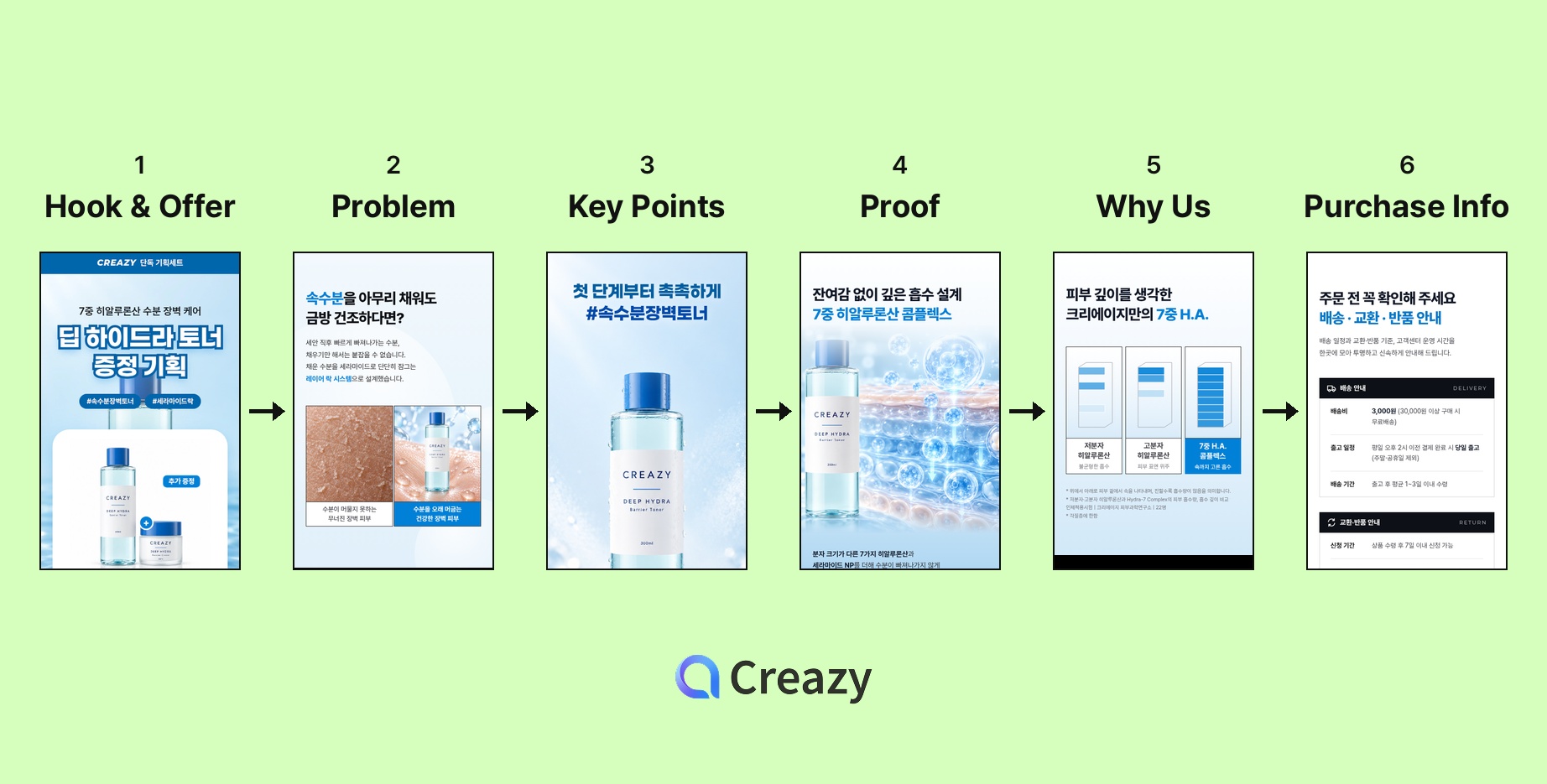
Shoppers keep asking questions in their heads as they scroll down a detail page: "What is this?", "Do I need it?", "Does it really work?", "How is it different?", "Should I buy it now?" A detail page that sells answers these questions in order.
- First screen and offer: Show in one line what the product is and who it's for, along with a reason to buy now, such as a bundle or a discount. If the first screen doesn't catch attention, nobody reads the rest.
- Problem: Start with the discomfort your customer feels. Write it so they recognize themselves, like "Does your skin feel tight right after washing?"
- Solution and key points: Explain how the product solves that problem in about 3 points. With too many points, none of them stick.
- Proof: Show what makes the points believable, such as ingredients, how it works, and test results. Only use evidence you actually have.
- What makes you different: Show how you compare with similar products. Comparing against a standard, like "typical products vs. ours," is safer than naming other companies.
- Purchase info: Finish with how to use it, the required product information notice, and shipping and returns. This is where you settle the worries that come up right before buying.
What ChatGPT can do and what you still have to do yourself
| Step | With ChatGPT prompts | What you still have to do |
|---|---|---|
| Organize product information | Possible | Enter accurate information |
| Selling points and section order | Possible | Review the results |
| Copy for each section | Possible | Keep the tone consistent across sections |
| Lifestyle images | Partly possible | Check that the product's shape hasn't changed |
| Design and layout | Difficult | Design it yourself in a design tool or outsource it |
| Export in platform sizes | Difficult | Export to sizes such as 860px wide |
Prompts can get you through planning and copy. The next steps, design, layout, and exporting in the right size, still need a person. That's why people end up opening a design tool or hiring a designer with their prompt results in hand. We cover the difference between general-purpose AI and dedicated detail page tools in more detail in How is an AI detail page tool different from general-purpose AI like ChatGPT?
Skip the prompts and finish with one photo
Creazy is an AI detail page service that handles the four steps above and the design in one go. Upload a product photo and write one line of description, and you get a draft in 1 minute, covering everything from product information to selling points, section order, copy, lifestyle images, and design.
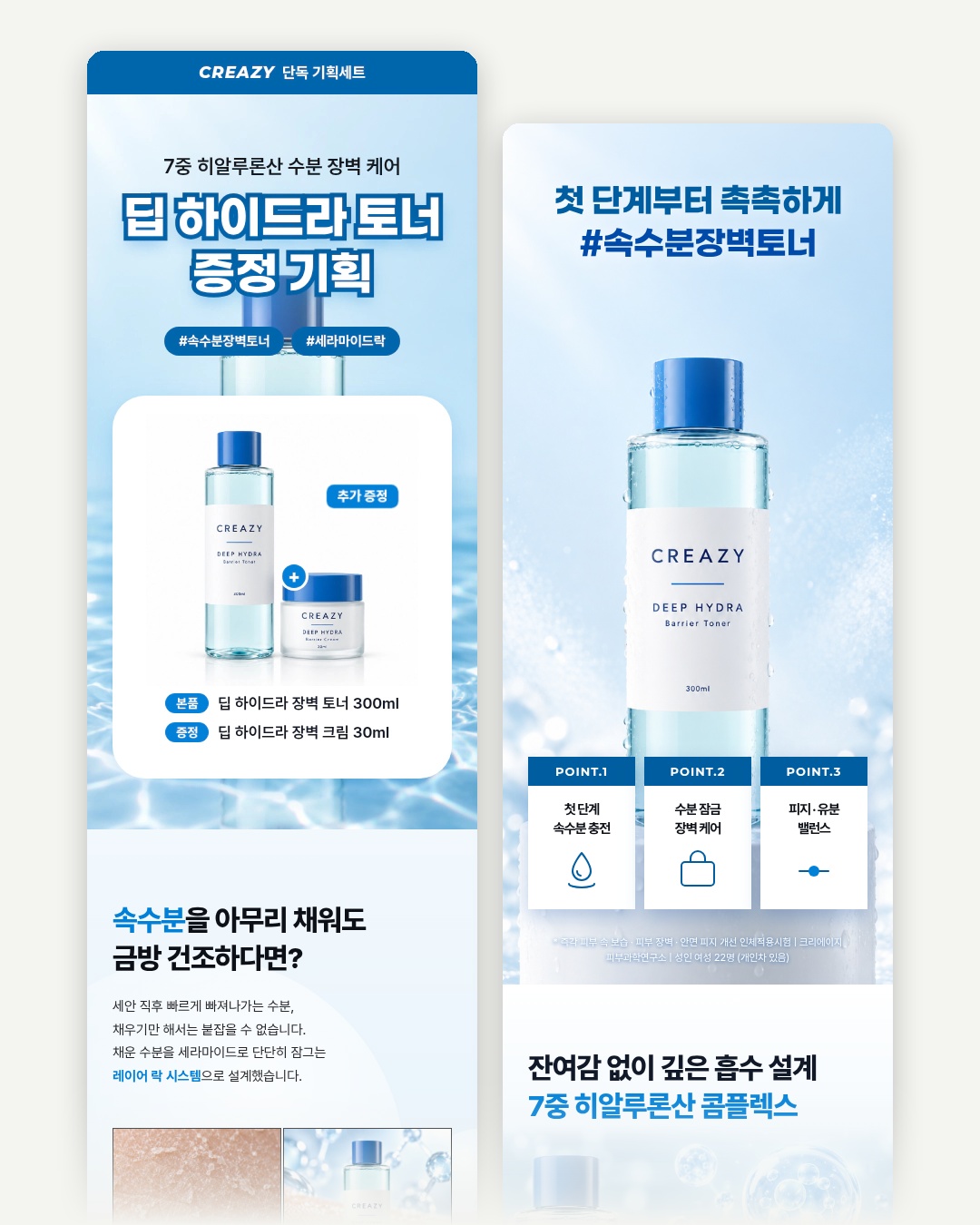
A detail page made from one toner photo and one line of description. (Sample product)
If you don't like something in the draft, click the text to edit it directly, or ask in the chat, for example "Make the headline bigger." You can export the finished page as images, Figma, Photoshop, or a web page, and save images straight in the Naver Smart Store size (860px wide).
You can make 2 detail pages for free when you sign up, so try putting one side by side with the plan you made using the prompts above.

Wrap-up
The key to AI detail page prompts is not asking for everything at once, but asking in order: organize, selling points, structure, copy. For the structure, start with first screen, problem, solution and key points, proof, what makes you different, and purchase info, then adjust it to your product. If you want to go from planning to design in one go, upload a photo to Creazy.
FAQ
Q. Can I use these prompts with AI other than ChatGPT?
Yes. Every step only needs a text answer, so any chat-based AI works. Ask prompts 1 to 4 in the same chat so the AI remembers the earlier answers and responds more accurately.
Q. Can I use the copy the AI writes as it is?
Always check it, because it can include things that aren't true. Use numbers, certifications, and claims like "No. 1" only when you have real evidence. Cosmetics and health supplements have rules about which claims can be used in ads, so be extra careful.
Q. How many sections should a detail page have?
There's no fixed number. Cover all 6 steps above with 1-3 sections each, and the page won't get too long on mobile. The sample toner page above has 17 sections, including the product information notice and shipping info.
Q. Do I need to write prompts in Creazy too?
No. A photo and one line of description are enough for the AI to organize the product features and do the planning and design. If you have a direction in mind, write it in the additional requests field, or ask for changes in the chat after the page is made.
Related Posts
What Is AI Product Detail Page Creation? The Process and Tips Every New Seller Should Know
AI Product Detail Page Creation: The Smartest Way for New Sellers to Get It Done What you'll learn AI product…
How is an AI detail page tool different from general-purpose AI like ChatGPT?
3 Reasons an AI Detail Page Tool and ChatGPT Produce Different Results What this article covers…
Product Detail Page Production Costs: A Comparison Guide Before You Outsource
How Much Should a Product Detail Page Cost? What this guide covers Product detail page production costs vary…