Draph Art vs Creazy: AI Detail Page Comparison
Draph Art AI detail pages compared with Creazy by pricing, free credits, editing costs and export. Creazy makes detail pages from Basic, and chat edits and exports use no credits while you're subscribed.

What this article covers
- Creazy creates a product detail page draft from product photos and a description, with outline, copy and design connected.
- During a subscription, AI chat edits to copy, design and layout, plus exports, use no credits.
- You can make detail pages from the Basic plan and continue to Shorts and thumbnails in the same project.
If you are looking for Draph Art reviews, compare it side by side with Creazy using the same criteria. Draph Art and Creazy both create AI detail page drafts from product information and photos, and both let you revise them through chat. This article lines up the plans and features of both services item by item.
For sellers listing products every month, the differences show up after the draft. Whether edits cost extra, which files you can hand off to designers and marketplaces, and which plan lets you make detail pages all affect the time and cost involved. If you are looking into Draph Art detail pages, check these three points first.
This article was written by the Creazy team. Pricing and features for both services were checked on November 7, 2026. Page counts and per-page costs below are estimates based on the stated credit and BP usage. Pricing and terms can change, so check the latest conditions before you pay.
For a comparison with more tools, see 2026 AI product detail page tool comparison.
1. Draph Art and Creazy at a glance
| Item | Creazy | Draph Art |
|---|---|---|
| Starting price (monthly) | Basic KRW 33,000, 24% off with annual billing | Pro KRW 29,900, up to 15% off with annual billing |
| Plans that make detail pages | Every paid plan from Basic | Pro Plus and Omni; not Pro |
| Starting free | Credits for 2 detail pages; free pages can be exported | 50 GBP for new sign-ups, enough for 1 short draft; cannot be used to edit detail pages |
| How you revise | Click text to edit directly; AI chat edits on paid plans use no credits | Chat edits; BP is also used for revisions and adding images |
| Export | PNG, JPG, WebP, GIF, Photoshop file, web URL you can open in Figma | PNG and JPG images, HTML code |
| Extra credits and balance | 100 extra credits for KRW 8,000; extra credits never expire | BP expires 1 month after top-up or at the end of the subscription, whichever comes first |
With Creazy, you can consider the credits used to make the first draft separately from the cost of AI chat edits on paid plans. With Draph Art, include BP for revisions and added images as well as the amount used for drafts of different lengths.
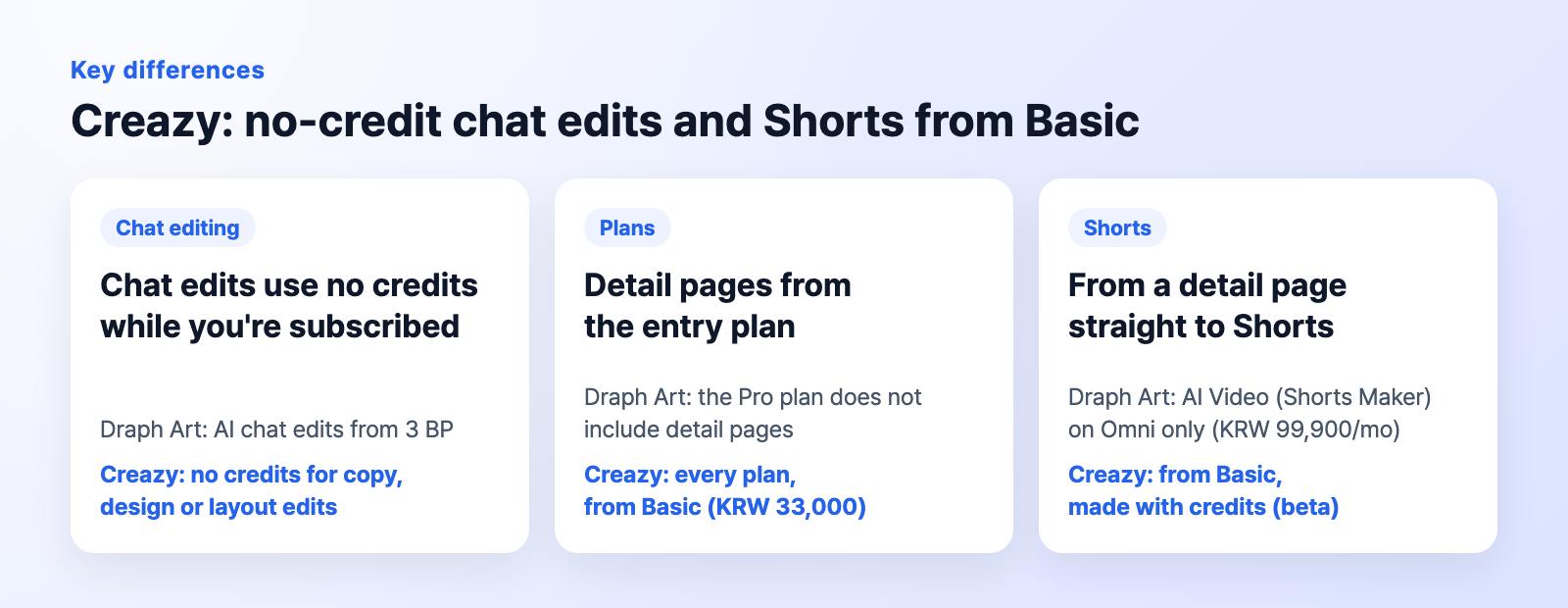
Creazyedits without using credits and makes Shorts from Basic
2. Draph Art free credits vs Creazy free trial
| Item | Creazy | Draph Art |
|---|---|---|
| Free offer | Credits for 2 detail pages | 50 GBP for new sign-ups |
| What that covers | Make 2 detail pages | Enough for 1 short draft |
| Free output | Can be exported | GBP cannot be used to edit detail pages |
Creazy: Try the finished file before deciding
When you sign up, you get free credits for 2 detail pages. You can export pages made for free, so you can see the actual file made with your product before deciding whether to subscribe.
Draph Art: Know the difference between free GBP and editing BP
Draph Art gives new sign-ups 50 GBP, enough to generate one short detail page draft. However, GBP cannot be used to edit detail pages. To try revisions in Draph Art after generating a draft, check which BP you can use and the plan requirements separately.
3. Draph Art pricing compared with Creazy plans
The table below compares plans by tier, not by price. Plans are paired in entry, mid, and top order. However, Draph Art Pro does not support AI detail pages, so for making detail pages, the actual counterpart to Creazy Basic is Draph Art Pro Plus.
Creazy's estimated page counts and costs assume 100–130 credits per detail page. Estimated page count is the monthly credit allowance divided by 100–130 credits; cost per page is the monthly price divided by the monthly allowance, then multiplied by 100–130. Actual output varies with the number of new images and videos generated.
Draph Art's per-page costs are simple estimates based on its draft generation amounts: 50 BP for short, 90 BP for medium, and 180 BP for long. The formula is monthly price ÷ monthly BP allowance × BP for a draft. This assumes all subscription BP goes to draft generation; BP for revisions and added images is separate. Results are shown to two decimal places in KRW.
Entry: Creazy Basic vs Draph Art Pro
| Item | Creazy Basic | Draph Art Pro |
|---|---|---|
| Monthly price | KRW 33,000 | KRW 29,900 |
| Annual billing | KRW 25,000 per month, 24% off | Up to 15% off |
| Monthly allowance | 500 credits | 720 BP |
| AI detail pages | Supported | Not supported |
| Estimated detail pages | About 3.8–5 | Detail pages not supported |
| Cost per page | About KRW 6,600–8,580 | Not calculated; detail pages not supported |
Pro costs less per month than Basic, but it cannot make detail pages. If that's your goal, compare Draph Art Pro Plus at KRW 49,900 per month with Creazy Basic at KRW 33,000.
Mid: Creazy Pro vs Draph Art Pro Plus
| Item | Creazy Pro | Draph Art Pro Plus |
|---|---|---|
| Monthly price | KRW 99,000 | KRW 49,900 |
| Annual billing | KRW 75,000 per month, 24% off | Up to 15% off |
| Monthly allowance | 2,000 credits | 1,500 BP |
| AI detail pages | Supported | Supported |
| Estimated detail pages | About 15.4–20 | Varies by draft length and revisions |
| Cost per page | About KRW 4,950–6,435 | Short about KRW 1,663.33 · medium KRW 2,994 · long KRW 5,988 (draft generation only) |
Top: Creazy Max vs Draph Art Omni
| Item | Creazy Max | Draph Art Omni |
|---|---|---|
| Monthly price | KRW 198,000 | KRW 99,900 |
| Annual billing | KRW 150,000 per month, 24% off | Up to 15% off |
| Monthly allowance | 5,000 credits | 3,300 BP |
| AI detail pages | Supported | Supported |
| Estimated detail pages | About 38.5–50 | Varies by draft length and revisions |
| Cost per page | About KRW 3,960–5,148 | Short about KRW 1,513.64 · medium about KRW 2,724.55 · long about KRW 5,449.09 (draft generation only) |
By a simple calculation for draft generation alone, Draph Art's short and medium drafts cost less in some tiers. If you revise several times before finishing, include revision BP too. On Creazy paid plans, AI chat edits and exports use no credits.
Creazy's price includes an AI draft with planning, copy and design, chat edits with no credits during a subscription, and Photoshop and web export. When you compare it with Draph Art detail pages, count how often you revise after the first draft.
Extra credits and remaining balance
Creazy sells an extra 100 credits for KRW 8,000, and extra credits do not expire. Check the terms for subscription credits separately from those for credits you purchase. Draph Art BP expires 1 month after the top-up date or at the end of the subscription, whichever comes first.
4. How Draph Art detail pages and Creazy are made
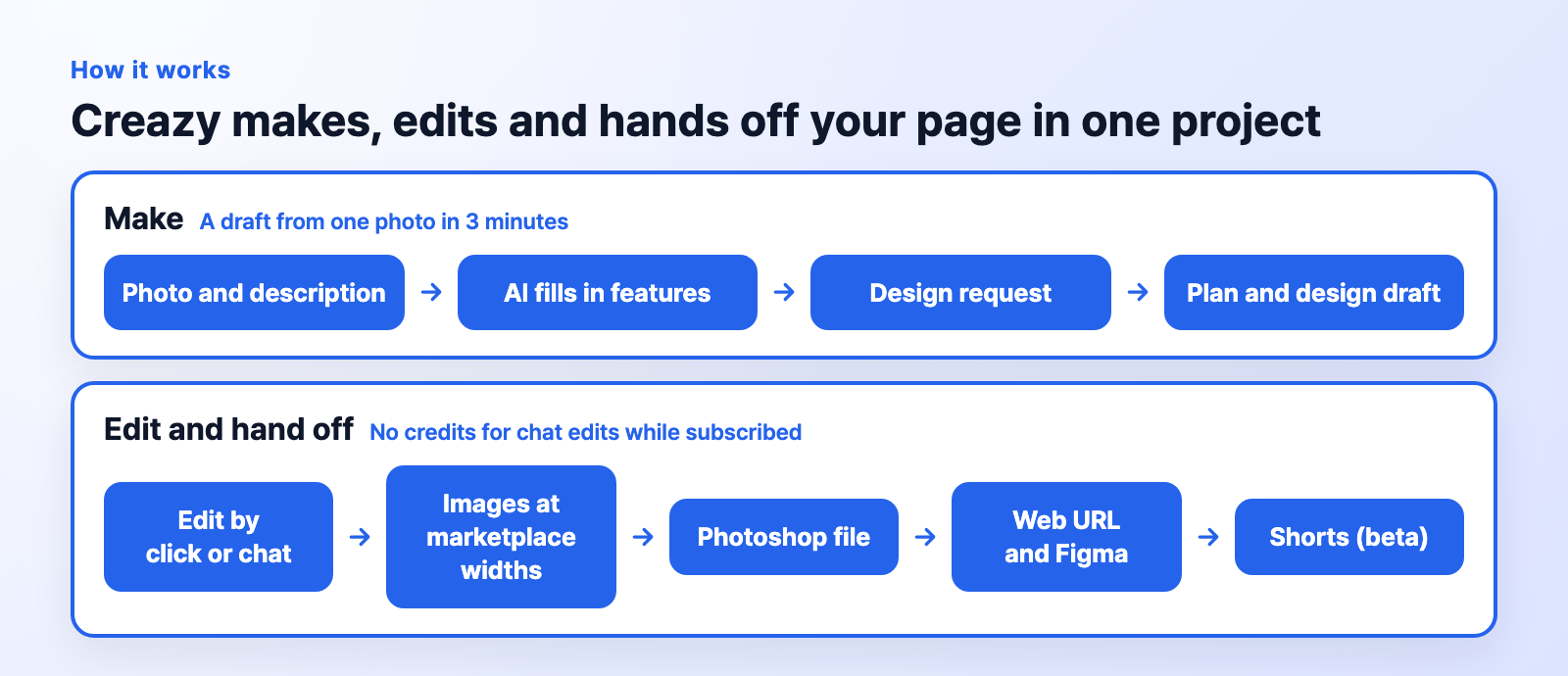
CreazyMaking, editing, and handing off a page
Creazy: From photos and description to a plan and design draft
Enter the product name, photos, and description, and Creazy's AI fills in the product features. It reads text on informational photos to identify features and adds to what you've already written instead of deleting it. Submit, and AI builds the structure into a draft with both the plan and design. If you'd rather decide the sections first, choose Plan it myself on the planning document screen.
If you have a detail page that sells well, capture and upload it. Creazy builds new sections in the same format so you can reuse a layout you like for your own product.
Draph Art: Enter product information to generate a detail page draft
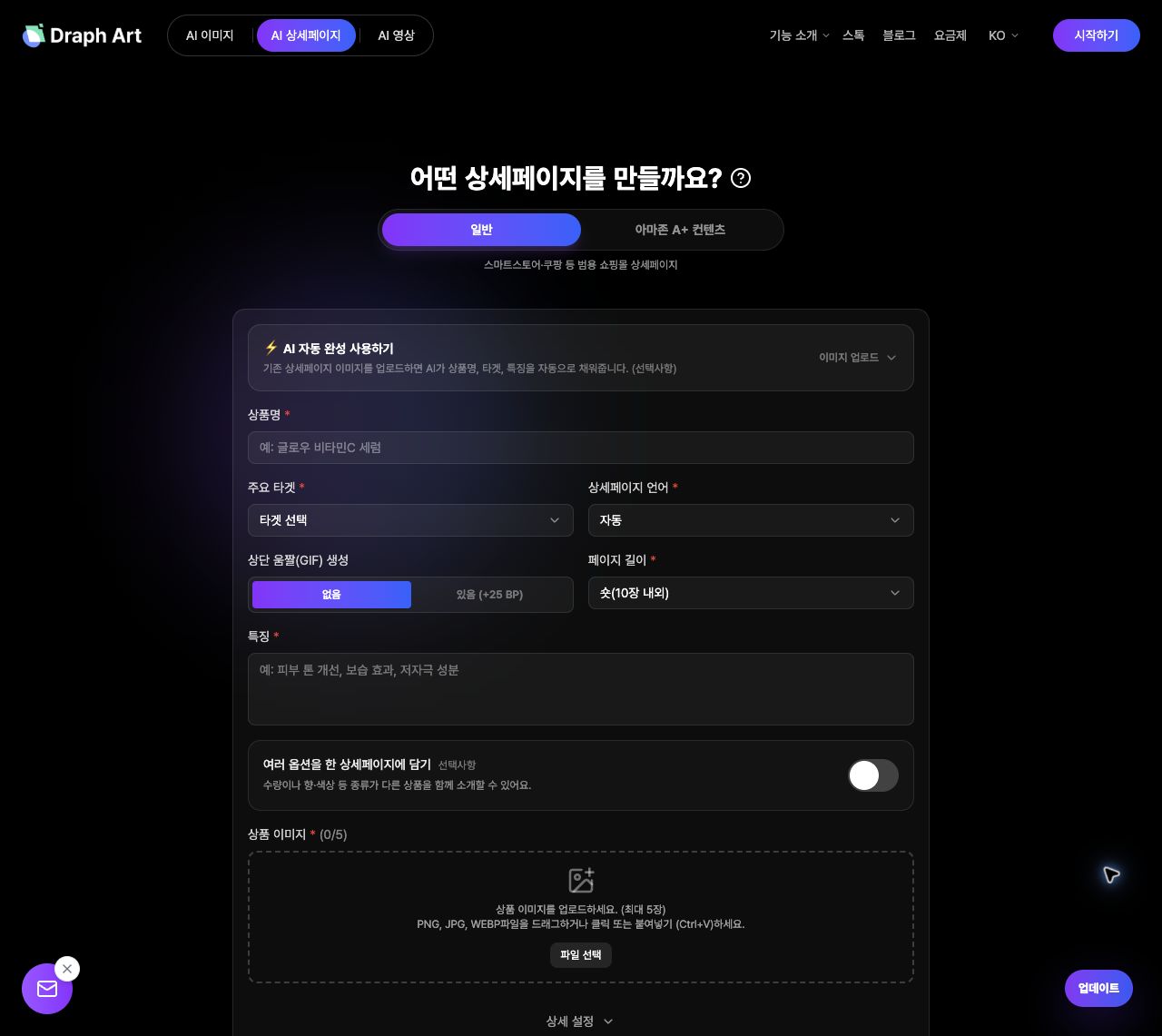
Draph ArtEntering product information and choosing the draft length
Draph Art also uses product information and photos to make an AI detail page draft, which you can then revise by chat. The BP required depends on draft length—short, medium, or long. Choose Pro Plus or Omni to make detail pages, and check the BP needed for revisions after the draft is made.
Compare them with your own product
You can make and export 2 detail pages for free with Creazy. Add a photo and description, make a draft, and download the actual file.

5. Draph Art revision BP vs Creazy chat edits
On Creazy paid plans, AI chat edits to copy, design, and layout, plus adding or deleting sections, use no credits. Tag the section you want to change to edit just that part, or click text in the editor to change it directly. Draph Art uses separate BP for revisions and added images. If you often refine copy and layout, compare the cost of both the first draft and revisions.

CreazyThe same Creazy section before and after a chat request
The first screen of the ceramide body lotion we made (a fictional product) had lab props and the line “for the whole family.” We asked in chat to remove definitive efficacy claims and show it being used in a bathroom. The background changed to a bathroom shelf, and the headline was rewritten as “The moment you take the ceramide body lotion off the bathroom shelf.”
| Task | Creazy credits |
|---|---|
| AI chat edits to copy, design, and layout on paid plans | No credits used |
| Clicking text in the editor to edit directly | No credits used |
| Export on paid plans | No credits used |
| Generating a new AI image | 5 credits per image |
| Moving images (GIF) | 30, 35, or 40 credits for 4, 6, or 8 seconds, respectively |
New projects and newly generated images and videos use credits. Separating chat revisions from new media generation makes it easier to estimate production costs.

CreazyThe body lotion page after chat edits, scrolled from the first screen to the end
6. Draph Art and Creazy export and extra features
Creazy exports images, Photoshop files, and web URLs. Exporting on paid plans uses no credits. Sellers listing on marketplaces and designers can each choose the format they need.
- Marketplace images: Download PNG or JPG, choose a marketplace width or enter your own. Animated sections can be downloaded as WebP or GIF.
- Photoshop file: Text is included as editable text layers, so designers can change the copy directly.
- Web URL and Figma: Publish the page to the web, then open its URL in Figma with the free html.to.design plugin to keep working there.
You can export detail pages made for free too. See the export guide. Draph Art offers PNG and JPG images and HTML code for handing off your work.
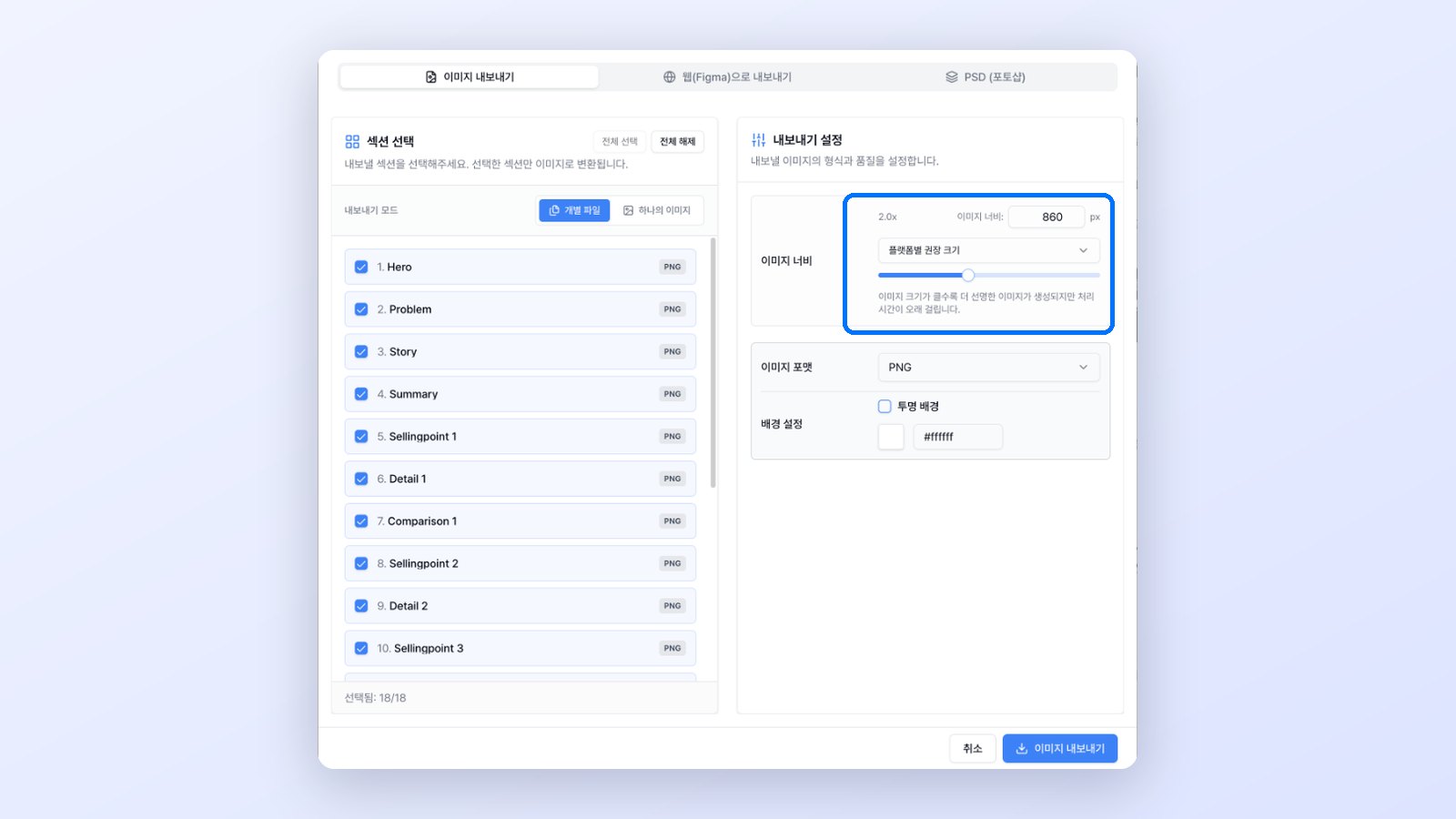
Creazy's export window with Image, Web (Figma), and Photoshop tabs and marketplace width options
Creazy: From detail pages to Shorts and thumbnails
Creazy makes Shorts from a product detail page project. After bringing over the product information and photos, choose a selling point and opening line to create a shopping Short with narration, subtitles, sound effects, and background music. Shorts (beta) are available from Basic, and newly generated videos use credits. GIFs cost 30, 35, or 40 credits for 4, 6, or 8 seconds, respectively.
Your pages stay after you cancel, and you can edit them directly without credits. Pages published to the web stay public too. If you subscribe only for peak season, check the storage and editing terms before reusing last season's pages.
7. Creazy is a good fit for these sellers
- Sellers who often change copy and structure and don't want to count credits for every revision
- Teams that finish pages by handing Photoshop files or Figma work to a designer
- Sellers who want to make detail pages and Shorts together on an entry-level plan
- Sellers who subscribe only during peak season but want to keep and reuse past pages
- Sellers who want to make 2 pages and export the files for free before paying
8. What changes when you use Creazy instead of Draph Art
- Detail pages from Basic: Draph Art makes detail pages from Pro Plus (KRW 49,900 per month), while Creazy makes them on every plan from Basic (KRW 33,000 per month).
- No counting per edit: During a subscription, AI chat edits and adding or removing sections use no credits.
- More hand-off formats: Besides marketplace images, you hand off a Photoshop file and a web URL (opened in Figma).
- Credits and pages stay: Purchased extra credits never expire, and your pages are kept after you cancel.
Upload the same product photos and description you used in Draph Art, and Creazy gives you a new draft right away.
9. Frequently asked questions
Which is cheaper, Draph Art or Creazy?
Draph Art Pro costs KRW 29,900 per month, less than Creazy Basic at KRW 33,000, but Pro does not support detail pages. If detail pages are your goal, compare from Draph Art Pro Plus at KRW 49,900 per month. Draph Art can also have a lower simple cost per page for draft generation alone. However, BP for revisions and added images is separate, while AI chat edits and exports on Creazy paid plans use no credits, so consider how much editing you expect to do.
Can I make Draph Art detail pages for free?
Draph Art gives new sign-ups 50 GBP, enough for 1 short detail page draft, and GBP cannot be used to edit detail pages. To keep making detail pages in Draph Art, you need the Pro Plus or Omni plan. Creazy provides free credits for 2 detail pages, and pages made for free can be exported.
What is the difference between Draph Art and Creazy?
Both create AI detail page drafts from product information and photos. Creazy makes detail pages from Basic, uses no credits for AI chat edits and exports during a subscription, and hands off images, Photoshop files and web URLs. Draph Art supports detail pages from Pro Plus, uses BP for revisions and added images, and hands off PNG and JPG images and HTML code.
What is a good AI detail page tool to use instead of Draph Art?
If you revise pages often and hand them to designers or several marketplaces, try Creazy. You get a planned, designed draft from one photo and a description, and during a subscription chat edits use no credits however many times you revise. You can make 2 detail pages for free and download the files.
How do I revise a page in Creazy after it's made?
Click text in the editor to change it directly, or type what you want to change in chat. Tag a section to edit only that part. On paid plans, AI chat edits to copy, design, and layout use no credits. Generating new images and videos uses separate credits.
10. Wrapping up
If you are looking into Draph Art detail pages, weigh the cost of revising and handing off pages along with the cost of drafts. Creazy creates a plan and design draft for your detail page, and repeated edits and exports use no credits during a subscription, so it suits sellers who want to revise in chat and hand off images, a Photoshop file or a web URL.
To compare them with your own product, start by making and exporting 2 detail pages for free with Creazy.
Related comparisons
- Mangoboard vs Creazy: AI Detail Page Comparison
- MiriCanvas vs Creazy: AI Detail Page Comparison
- Hookable vs Creazy: AI Detail Page Comparison
- Comparing AI Product Detail Page Tools in 2026: How Draph Art, Creazy, Gabia AI Editor, and Hookable Differ
- Comparing 7 AI Tools That Help You Create Product Detail Pages in 2026