Mangoboard vs Creazy: AI Detail Page Comparison
Mangoboard AI detail pages compared with Creazy by pricing, free plans, creation workflow, editing, and file export. See why Creazy suits sellers who revise their pages often.

What this article covers
- Creazy creates a product detail page draft from product photos and a description, with outline, copy, and design connected.
- During a subscription, revising copy, design, and section structure in AI chat costs no credits, however many times you do it.
- Hand off finished pages as marketplace images, a Photoshop file, or a web address, and continue to thumbnails and Shorts from the same home screen.
If you’re considering Mangoboard AI Designer, look at the work that comes after the first result, too. Sellers often need to change a discount message, remove overlapping sections, and download images sized for a marketplace. Both services can draft a product detail page from product photos and descriptions, but they handle revisions and delivery differently.
Creazy focuses on creating a combined outline, copy, and design draft from product information, revising multiple parts in chat, and then handing off marketplace images or a PSD. This article uses an existing demo of a fictional body lotion to show which tasks sellers can reduce, and also compares Mangoboard’s editor and prompt-based revision paths.
This article was written by the Creazy team, and both services’ prices and features were checked on November 6, 2026. Prices and availability can change, so check the latest terms before paying.
For more tools, see Comparing AI Product Detail Page Tools in 2026: How Draph Art, Creazy, Gabia AI Editor, and Hookable Differ.
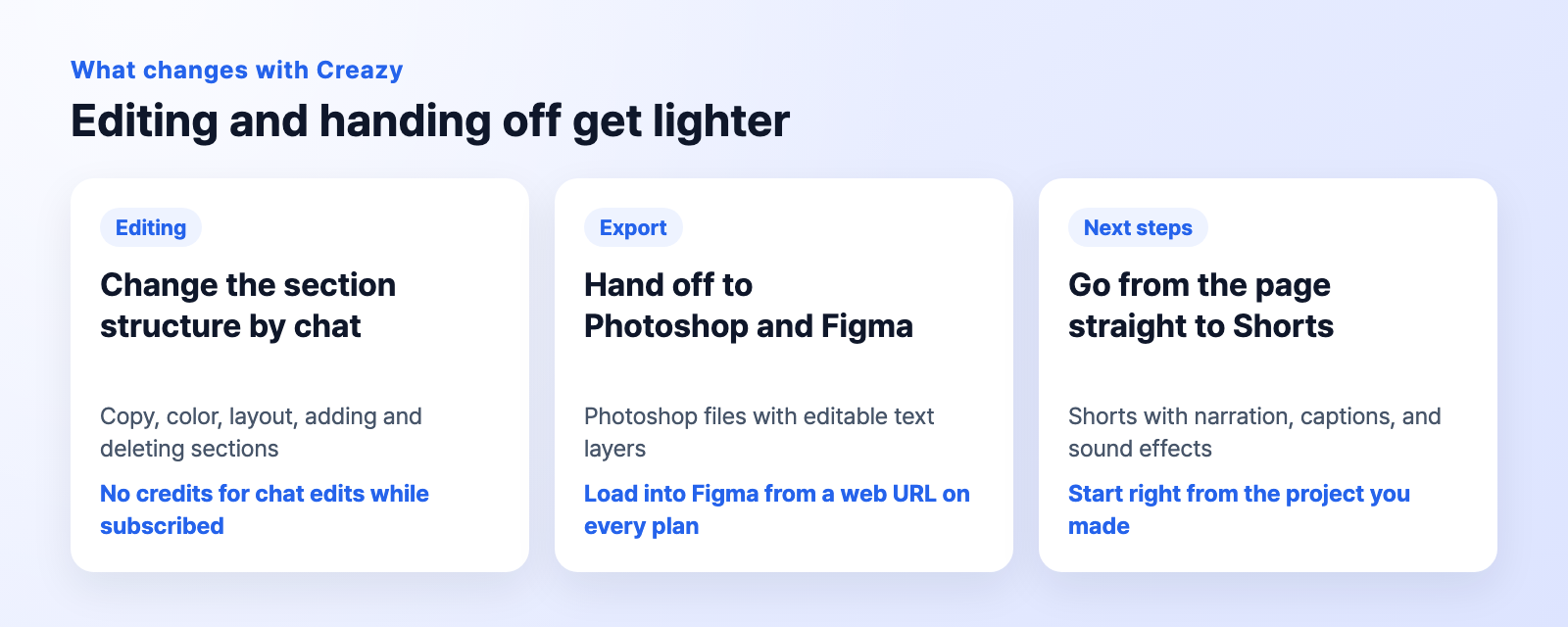
CreazyA card summarizing the product-page creation, editing, and handoff workflow. Figma uses a plugin to import a web address.
1. Mangoboard and Creazy at a glance
| Task | Creazy | Mangoboard |
|---|---|---|
| Main types of content | Product detail pages, thumbnails, Shorts | Product detail pages, card news, PPT, and other designs and videos |
| Getting started on a product detail page | Generate an outline, copy, and design draft from a product name, photos, and description | Enter product photos and an introduction to generate an AI draft |
| Editing after creation | Edit text directly, use Free Mode, or revise copy, layout, and sections with AI chat | Edit elements in the editor or use the prompt-editing path for a page or selected area |
| What to check for repeated revisions | AI chat edits, additions, deletions, and exports use 0 credits during a paid subscription | AI features use points. Points are deducted when you create or edit |
| Delivering the result | Marketplace-specific images, Photoshop file, web address, and HTML/iframe on Pro and Max | Formats such as images, PDF, PPTX, and video, depending on the plan |
| Best suited to | Sellers who want to connect product-page revisions with marketplace and designer handoff | Users who want to refine many kinds of designs directly with templates and an editor |
2. What can you try for free?
| Free start | Creazy | Mangoboard |
|---|---|---|
| Product detail page trial | Enough credits to create 2 product detail pages upon sign-up | The AI product detail page introduction advertises 1 free creation |
| AI usage allowance | 5 free AI chat turns per project | The pricing page lists 300 AI-only points every day |
| Checking the result | Pages created for free can also be exported | Free accounts download JPG and PNG images |
| Conditions to check first | Use the credits provided, with no trial-period limit | Watermarks on paid elements, pro fonts, and AI photos; GIFs limited to 2 per day |
Creazy: revise and export using your own product
During the free trial, check whether the result is ready for actual selling, not just whether the first screen looks good. Upload product photos to make a draft, edit the title directly, refine sections in chat, and download the result. Free accounts have a set number of AI chat turns, so collecting your requested changes into a few prompts makes it easier to understand the trial limits.
Mangoboard: one free creation and daily points
Mangoboard lets you create one AI product detail page for free after sign-up, and gives free members 300 AI-only points every day. Paid elements and AI photos used in a free result carry a watermark.
3. Paid plans: compare their terms instead of matching tiers by name
Choose Creazy with its credits for creating new content and repeated revisions during a subscription in mind. With Mangoboard, consider the design-tool pass, AI points, and intended-use requirements together. Plans with similar names or positions in a table do not necessarily serve the same purpose.
Creazy: choose by creation volume and handoff format
| Plan | Monthly billing, 30 days | Monthly equivalent with annual billing | Credits included |
|---|---|---|---|
| Basic (includes a watermark) | ₩33,000 | ₩25,000 | 500 |
| Pro | ₩99,000 | ₩75,000 | 2,000 |
| Max | ₩198,000 | ₩150,000 | 5,000 |
Opening a product-page project costs 100 credits. Including new media generation, a page typically uses 100~130 credits. For example, Basic (includes a watermark) covers about 3.8~5 pages in this range. Actual output varies with the amount of image and video generation. During a subscription, AI chat edits to copy, design, and layout, adding or deleting sections, and exporting do not use additional credits.
Subscription credits are issued every 30 days and do not roll over. An additional purchase costs ₩8,000 for 100 credits, and purchased credits do not expire. Annual billing is discounted 24%. See Creazy pricing for details.
Mangoboard: distinguish the design pass from extra AI usage
| Plan | 1 month | 1 year | AI points | Who it’s for |
|---|---|---|---|---|
| Free | ₩0 | ₩0 | 300 daily | All members |
| General | ₩29,000 | ₩320,000 | 1,200 daily | Individuals, sole proprietors, self-employed users |
| Pro | ₩49,000 (₩48,000 per month with card auto-payment) | ₩560,000 | 2,500 base | Companies, public institutions, universities, agencies |
| AI Booster (1 day) | ₩3,000 / ₩9,000 | - | 3,000 / 9,000 extra | Pro users |
Mangoboard prices include VAT. Choose a plan based on the final place the work will be used, not who creates it; the stated limit is one account per person. Points are deducted when you create a product detail page with AI Designer, and 3,000 points cover up to 10 pages.
Creazy pricing includes an AI-made draft covering outline, copy, and design, chat edits with no deductions during a subscription, and Photoshop and web export. The more you revise after creating, the bigger this difference becomes.
4. The creation process starts with photos and product information
Creazy: bring planning, copy, and a design draft together
Enter a product name, photos, and description, and AI reads the product’s features to create a draft with a section structure, copy, and styled images. Include details that must be accurate, such as volume, package contents, and conditions of use. If you want to choose the structure yourself, select Plan it yourself in the planning brief to set the direction.
This process reduces the work of starting with a blank screen, writing a headline, arranging sections, and placing styled images separately. Below is a screen recording of a fictional body lotion page that we made ourselves, played back at high speed.
CreazyExisting live demo of creating a body lotion product detail page from photos and a description (fictional product, sped up)
Mangoboard: choose the editor or prompt-editing path
Mangoboard has a path for editing in the editor and a path for editing with prompts. Add product photos and an introduction, then review the outline. In the prompt path, you can also choose a reference template style. After generation, edit and save using the path you selected.
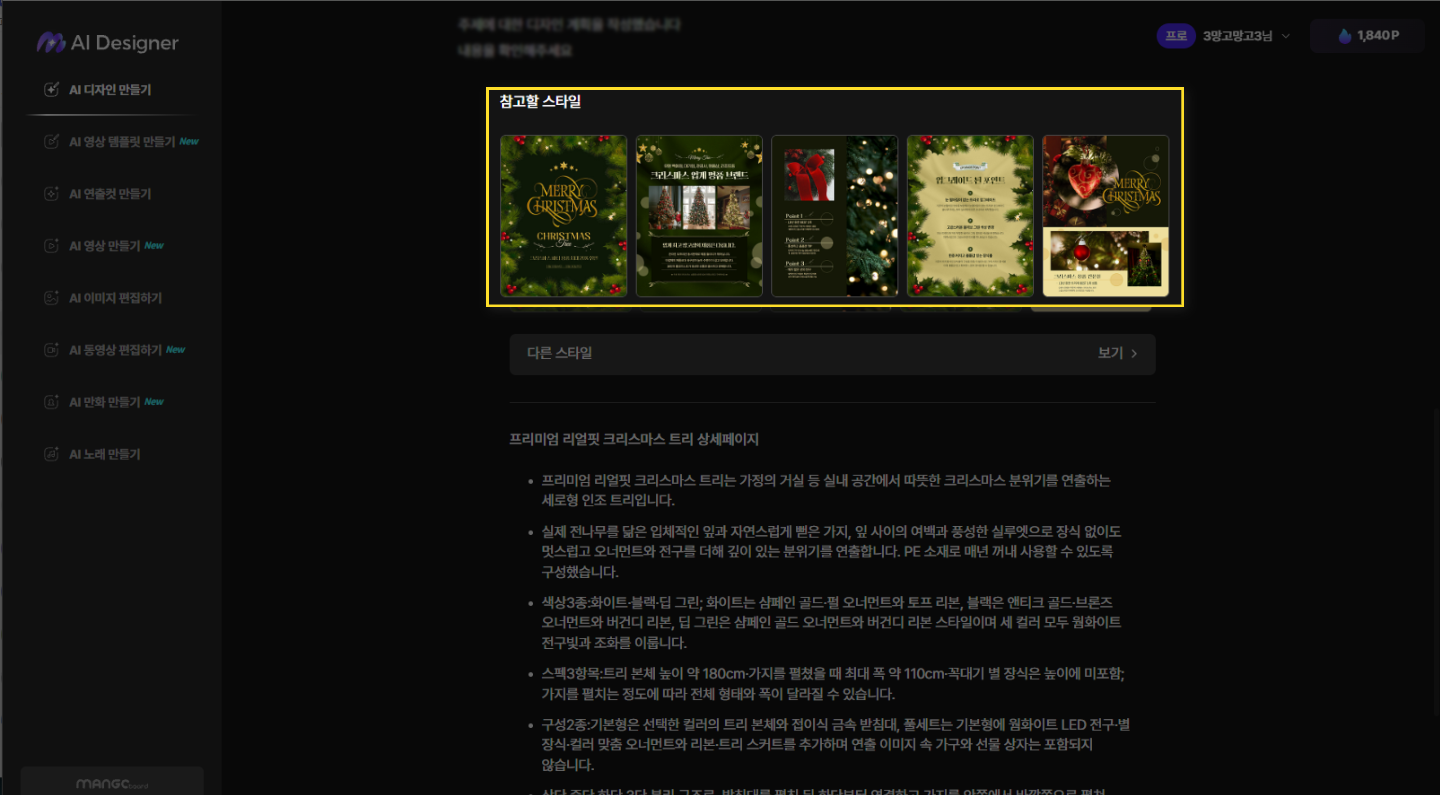
MangoboardExample from the official guide showing how to choose a reference template style for a product
The existing body lotion example moves through scenes of use in a bathroom, product features, and required product information. Review AI-generated copy and product figures against the actual product information before using them.
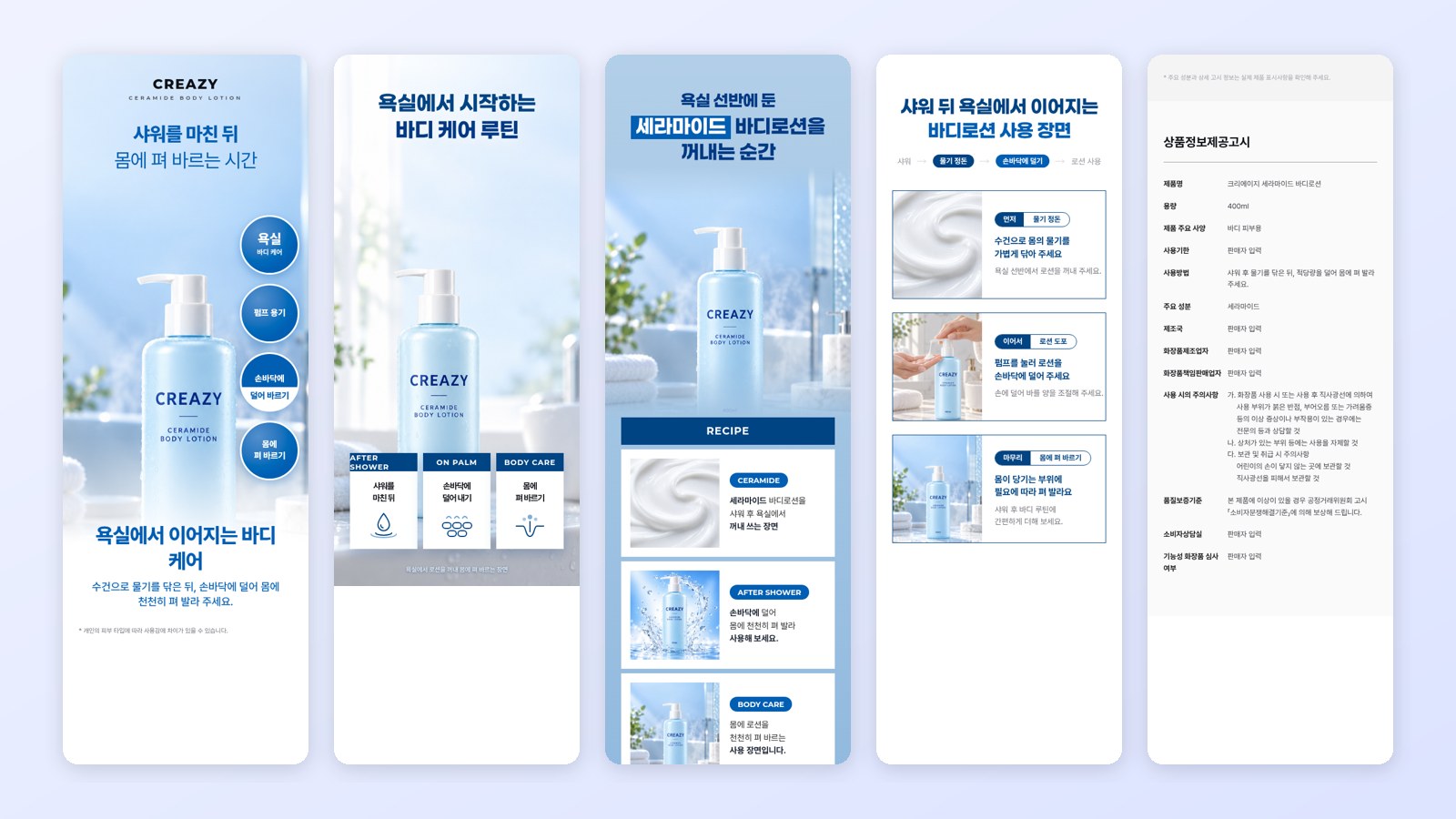
CreazyResult from an existing live demo of a fictional body lotion product detail page refined in chat

5. Repeated revisions: separate multi-part edits from new image generation
Creazy: request section deletion and sentence changes together
When a discount message changes, you can click and edit a single line. To change several things together, specify them in chat. In the body lotion demo, the request combined deleting duplicate sections with revising the remaining copy:
Delete sections 8, 9, and 10 because their content overlaps, and rewrite the remaining sections with distinct wording about scenes of use.
This can reduce the work of deleting each section and rewriting the remaining copy one line at a time. You can target a specific part in a request or undo a change, and adjust the layout directly in Free Mode.
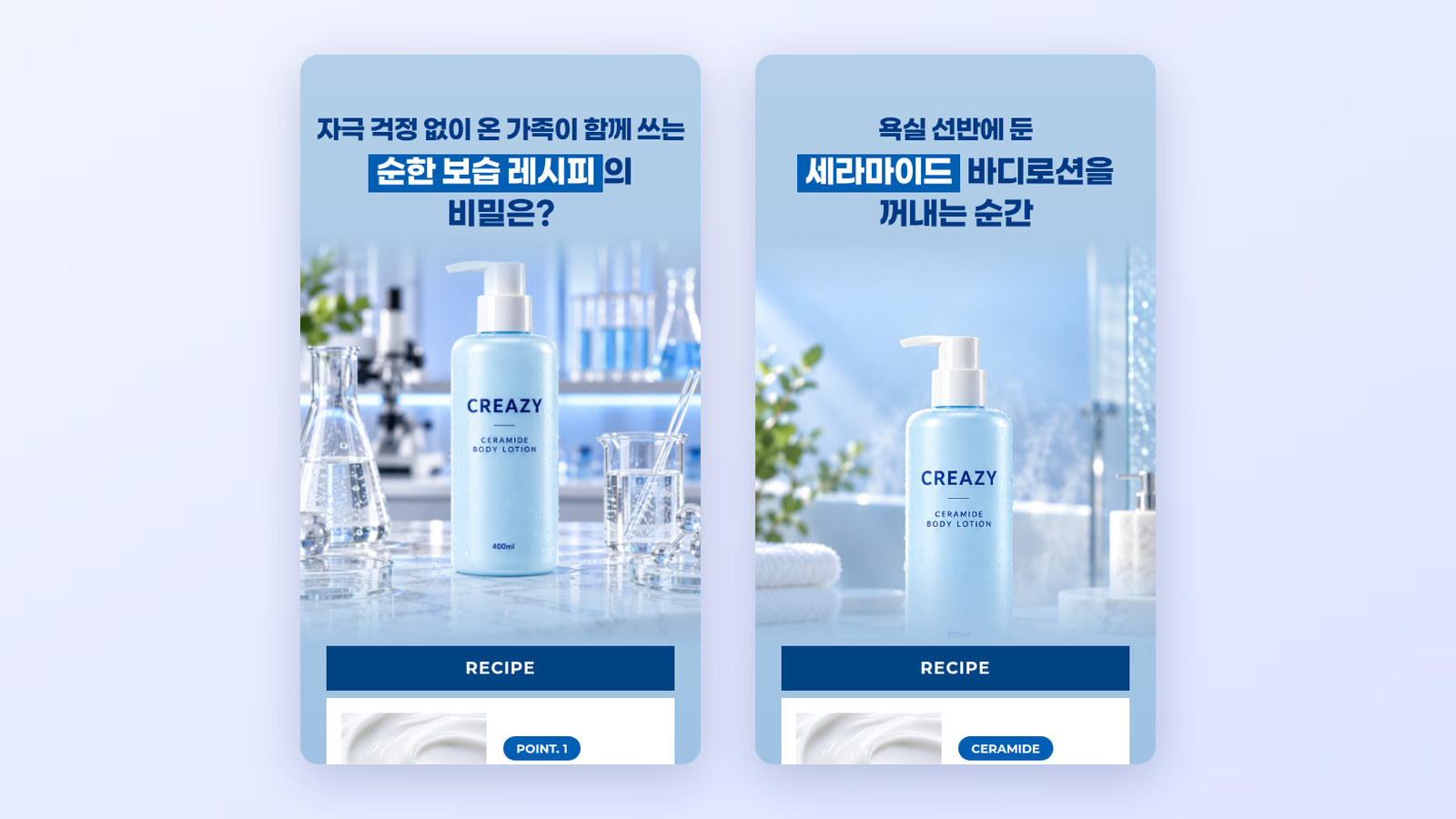
CreazyExisting live demo shown side by side before and after editing a body lotion page
AI chat edits, additions, and deletions use 0 credits during a subscription. If a request includes generating a new AI image or video, generation credits are charged separately. One new image costs 5 credits; AI video/GIF costs 30 credits for 4 seconds / 35 for 6 seconds / 40 for 8 seconds. Separating repeated edits to prices, promotions, and copy from new media creation makes costs easier to estimate.
Mangoboard: edit elements directly or revise part of a page with a prompt
In the editor path, adjust text, colors, and image position and size directly. In the prompt path, revise the entire page or a selected area in natural language. If you request a revision with a prompt, you cannot return to the pre-edit page, so download the earlier draft first if you need it.
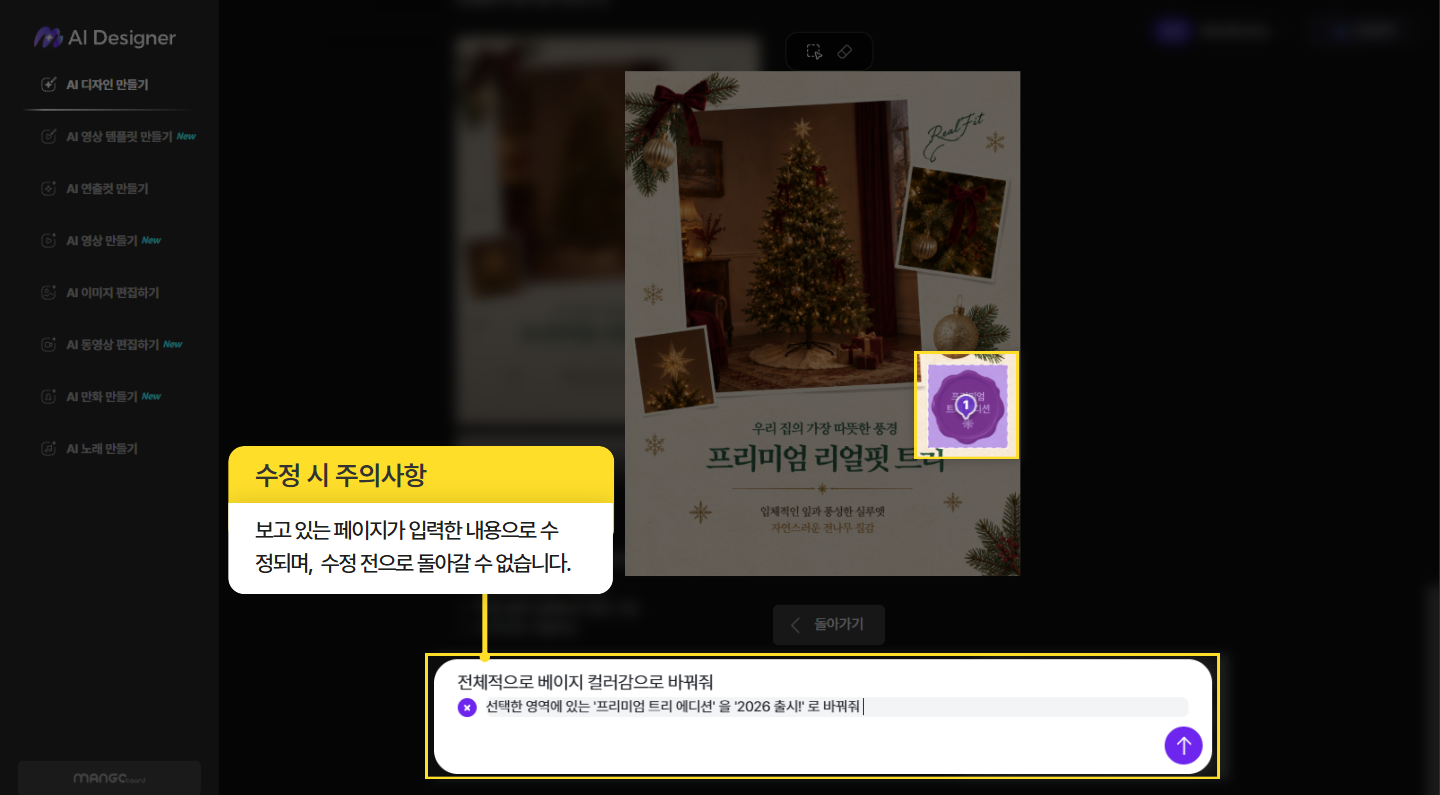
MangoboardOfficial guide example of changing selected-area copy and page colors with a prompt
Creazy’s strength lies in more than simply having chat: it connects refining several sections in the same project, repeating edits without revision-credit costs, and handing off the file. You can also revert to a chosen point, so there is less need to save drafts separately.
6. Export and extra features: marketplace handoff, file editing, and team use
Creazy: marketplace images and handoff to designers
Choose a format and width in the export window to download a finished page. Exporting itself does not use credits.
- Images: PNG and JPG, plus GIF and WebP for animated sections. Choose a marketplace-specific width or enter one yourself.
- Photoshop file: Hand off a Photoshop file with text layers to a designer.
- Web address: Basic (includes a watermark) provides a web-published link with a watermark. Pro and Max support watermark-free web publishing, HTML export, and iframe.
- Continue working in Figma: Import a web address with the html.to.design plugin. This is different from exporting a Figma file directly.
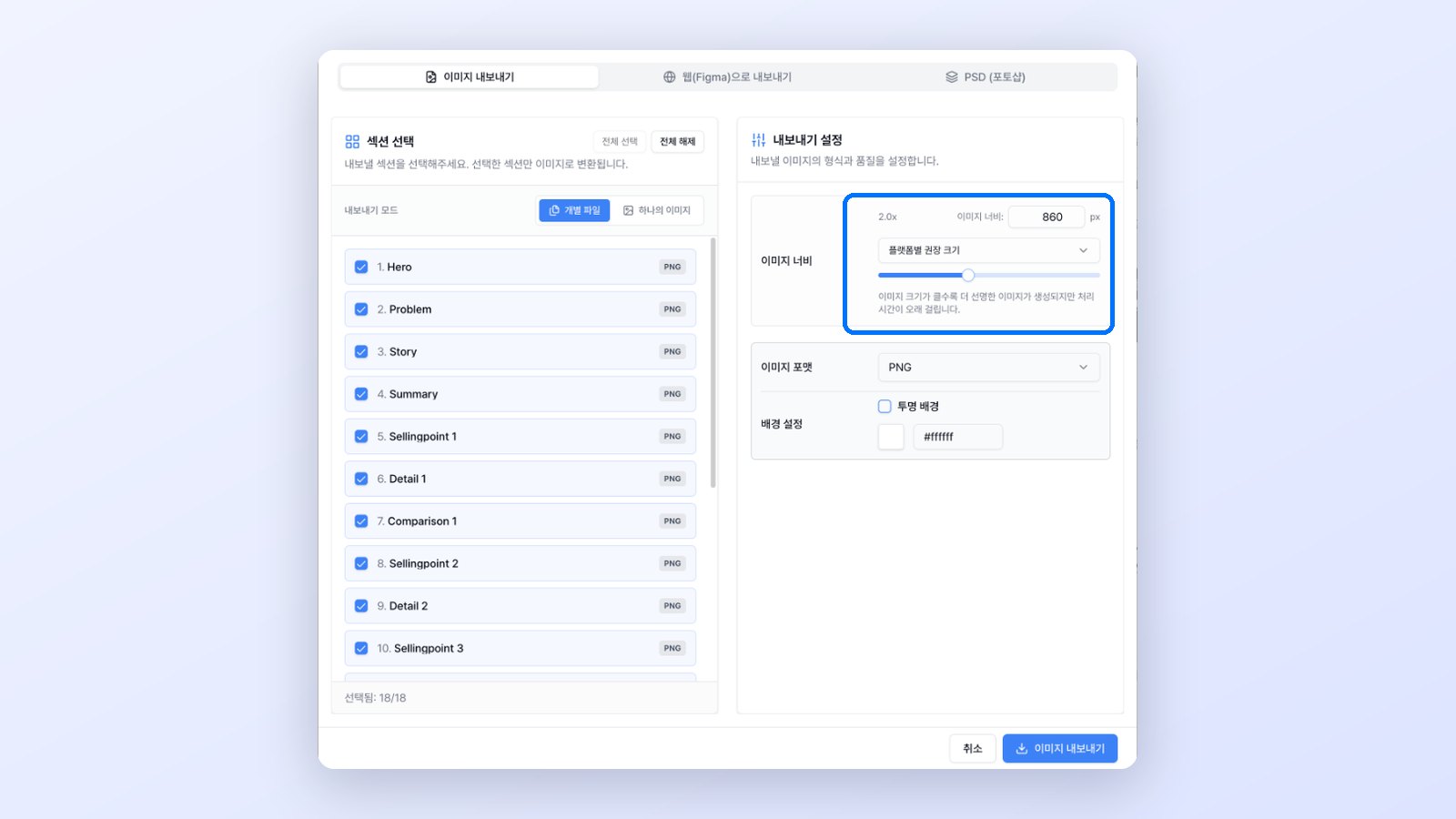
CreazyExisting export screen for choosing a format and marketplace-specific image width
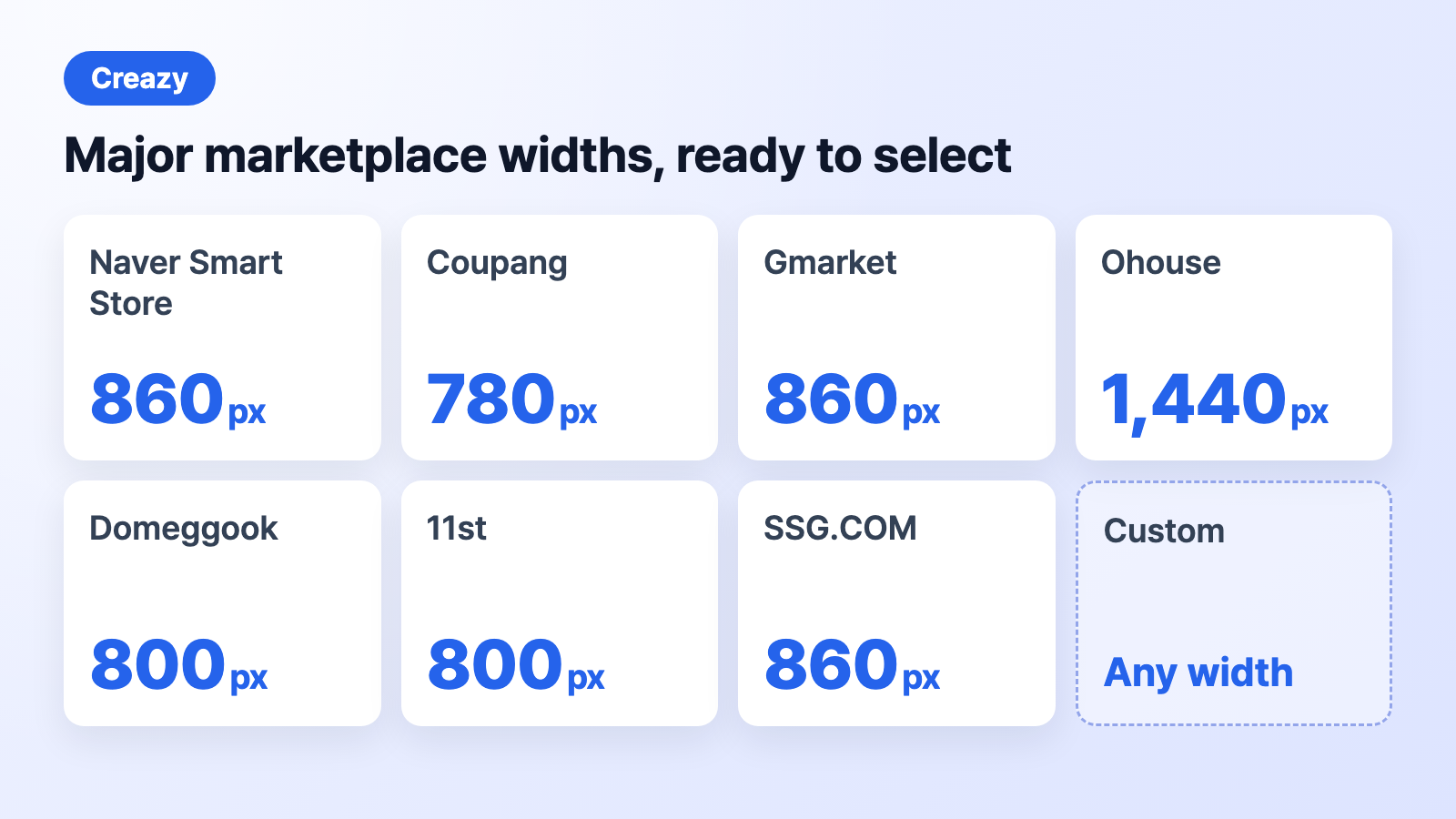
CreazyGuide to the main marketplace sizes available when exporting
Continue from a product detail page by selecting Create Shorts to prepare a video for the same product. From the home screen, choose product detail pages, thumbnails, or Shorts to get started. New media generation costs are separate from chat edits.
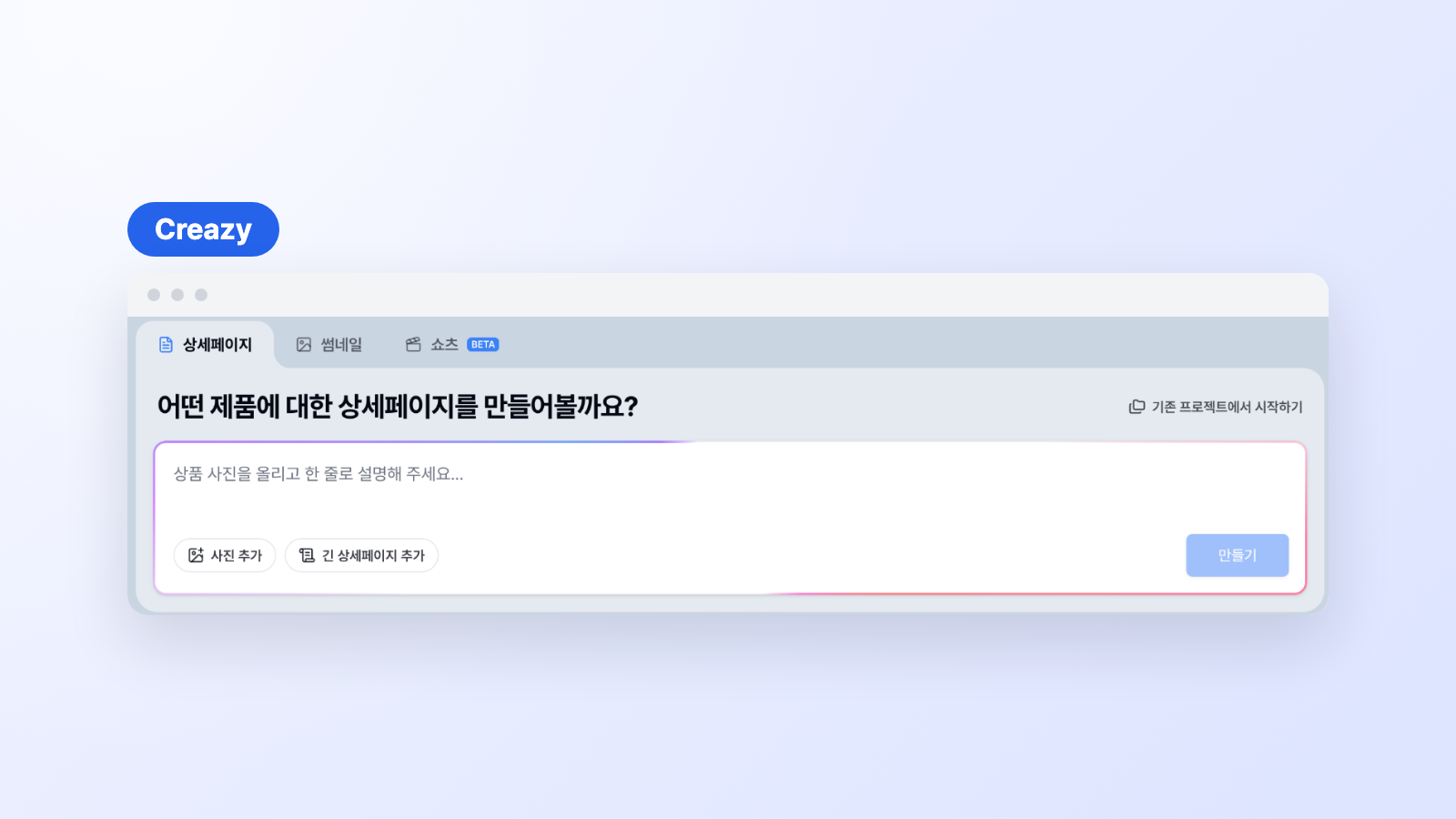
CreazyExisting home screen for choosing product detail pages, thumbnails, or Shorts
Mangoboard: check output formats and collaboration terms
Mangoboard lets you receive JPG and PNG on the free plan; print-ready PDF, PPTX with separated images, and MP4 on General; and editable-text PPTX and WebP on Pro. A result edited with a prompt is imported into the editor as a flattened image, and you continue from there. Creazy hands off the file so you can edit text directly through the Photoshop file’s text layers.
7. Creazy is a good fit for sellers who...
- Are falling behind on drafts: want an outline, copy, and design together from product photos and information.
- Keep revising pages: want to group promotion changes, duplicate-section cleanup, and scene-specific copy edits in chat.
- Prepare assets for different marketplaces: want to change image widths and formats in a finished project before handing it off.
- Work with designers: want to hand over a seller-created draft as a PSD or web address for follow-up editing.
- Expand product content: want to continue from product detail pages into thumbnail and Shorts creation.
If you keep refining the same product through day-to-day operations, compare the work involved in revision requests and delivery as well as the cost of creating the initial page.
8. What changes when you use Creazy instead of Mangoboard
With Mangoboard, you still pick a template and adjust the copy, photos, and layout yourself. Switch to Creazy and you get a draft from your product information, ask for changes in chat, and hand the page off as marketplace images and a Photoshop file right away. Chat edits and exports use no credits while you’re subscribed, so you don’t have to watch your points every time you revise, as you do with Mangoboard.
9. Frequently asked questions
Which service costs less?
Monthly prices are ₩29,000 for Mangoboard General and ₩49,000 for Pro (₩48,000 with card auto-payment), while Creazy Basic (includes a watermark) is ₩33,000, or ₩25,000 per month with annual billing. Creazy pricing includes an AI-made draft covering outline and design, chat edits with no deductions during a subscription, and Photoshop and web export, so the burden is lighter for product pages that need frequent changes.
Can I edit with natural-language prompts in both services?
Yes. Creazy uses chat to revise copy, design, layout, and sections; chat edits, additions, and deletions use 0 credits during a paid subscription. New image and video generation is charged separately. Mangoboard can also revise a full page or selected area in its prompt-editing path. You cannot return to the previous page after a revision request on this path, so download any draft you need first.
Can I review a product detail page made for free before deciding?
Creazy provides enough credits to create 2 product detail pages at sign-up, and free results can be exported. Free AI chat is limited to 5 turns per project. Mangoboard lets you create one AI product detail page for free; free downloads are JPG and PNG, and paid elements carry a watermark. Making edits to your own product and saving an actual file makes it easier to judge which workflow suits you.
10. Conclusion
Consider Creazy if you want to start with photos and product information, revise several sections in chat, and hand off marketplace images, a PSD, or a web address within one project. Repeated revisions and exports during a subscription use no credits, which can work well for product pages that keep changing after the first draft.
Because pages created for free can also be exported, create a draft for your own product, then try one of your usual edits and save the file.
Related comparisons
- MiriCanvas vs Creazy: AI Detail Page Comparison
- Draph Art vs Creazy: AI Detail Page Comparison
- Hookable vs Creazy: AI Detail Page Comparison
- Comparing AI Product Detail Page Tools in 2026: How Draph Art, Creazy, Gabia AI Editor, and Hookable Differ
- Comparing 7 AI Tools That Help You Create Product Detail Pages in 2026